233 lines
14 KiB
Markdown
233 lines
14 KiB
Markdown
<div align="center">
|
||
<br>
|
||
<a href="#-announcement-"><kbd> <br> Read this First <br> </kbd></a>  
|
||
<a href="#-to-use-this-script"><kbd> <br> How to use this script <br> </kbd></a>  
|
||
<a href="#gallery-and-videos"><kbd> <br> Gallery <br> </kbd></a>  
|
||
</div><br>
|
||
|
||
<div align="center">
|
||
|
||
## 💌 ** JaKooLit's Arch Hyprland Install Script ** 💌
|
||
|
||
   <a href="https://discord.gg/9JEgZsfhex"> <img src="https://img.shields.io/discord/1151869464405606400?style=for-the-badge&logo=discord&color=cba6f7&link=https%3A%2F%2Fdiscord.gg%9JEgZsfhex"> </a>
|
||
|
||
|
||
<br/>
|
||
</div>
|
||
|
||
<div align="center">
|
||
👇 KOOL's Hyprland-Dots related Links 👇
|
||
<br/>
|
||
</div>
|
||
<div align="center">
|
||
<br>
|
||
<a href="https://github.com/JaKooLit/Hyprland-Dots"><kbd> <br> Hyprland-Dots repo <br> </kbd></a>  
|
||
<a href="https://www.youtube.com/playlist?list=PLDtGd5Fw5_GjXCznR0BzCJJDIQSZJRbxx"><kbd> <br> Youtube <br> </kbd></a>  
|
||
<a href="https://github.com/JaKooLit/Hyprland-Dots/wiki"><kbd> <br> Wiki <br> </kbd></a>  
|
||
<a href="https://github.com/JaKooLit/Hyprland-Dots/wiki/Keybinds"><kbd> <br> Keybinds <br> </kbd></a>  
|
||
<a href="https://github.com/JaKooLit/Hyprland-Dots/wiki/FAQ"><kbd> <br> FAQ <br> </kbd></a>  
|
||
<a href="https://discord.gg/9JEgZsfhex"><kbd> <br> Discord <br> </kbd></a>
|
||
</div><br>
|
||
|
||
<h3 align="center">
|
||
<img src="https://github.com/JaKooLit/Telegram-Animated-Emojis/blob/main/Activity/Sparkles.webp" alt="Sparkles" width="38" height="38" />
|
||
KooL Hyprland-Dotfiles Showcase
|
||
<img src="https://github.com/JaKooLit/Telegram-Animated-Emojis/blob/main/Activity/Sparkles.webp" alt="Sparkles" width="38" height="38" />
|
||
</h3>
|
||
|
||
<div align="center">
|
||
|
||
https://github.com/JaKooLit/Hyprland-Dots/assets/85185940/50d53755-0f11-45d6-9913-76039e84a2cd
|
||
|
||
</div>
|
||
|
||
### Gallery and Videos
|
||
<details>
|
||
<summary>
|
||
📷 Screenshots
|
||
</summary>
|
||
<p align="center">
|
||
<img align="center" width="49%" src="https://raw.githubusercontent.com/JaKooLit/screenshots/main/Hyprland-ScreenShots/Arch-v2/Arch-Default-Layout.png" /> <img align="center" width="49%" src="https://raw.githubusercontent.com/JaKooLit/screenshots/main/Hyprland-Dots-Showcase/dark-theme.png" />
|
||
<img align="center" width="49%" src="https://raw.githubusercontent.com/JaKooLit/screenshots/main/Hyprland-Dots-Showcase/Light-theme.png" /> <img align="center" width="49%" src="https://raw.githubusercontent.com/JaKooLit/screenshots/main/Hyprland-ScreenShots/Arch-v2/Another-Screenshot.png"" />
|
||
</p>
|
||
|
||
<p align="center">
|
||
<img align="center" width="49%" src="https://raw.githubusercontent.com/JaKooLit/screenshots/main/Hyprland-Dots-Showcase/default-waybar.png" /> <img align="center" width="49%" src="https://raw.githubusercontent.com/JaKooLit/screenshots/main/Hyprland-Dots-Showcase/rofi.png" />
|
||
<img align="center" width="49%" src="https://raw.githubusercontent.com/JaKooLit/screenshots/main/Hyprland-Dots-Showcase/wlogout-dark.png" /> <img align="center" width="49%" src="https://raw.githubusercontent.com/JaKooLit/screenshots/main/Hyprland-Dots-Showcase/showcase2.png"" />
|
||
<img align="center" width="49%" src="https://raw.githubusercontent.com/JaKooLit/screenshots/main/Hyprland-Dots-Showcase/waybar-layout.png" /> <img align="center" width="49%" src="https://raw.githubusercontent.com/JaKooLit/screenshots/main/Hyprland-Dots-Showcase/waybar-style.png"" />
|
||
</p>
|
||
|
||
|
||
#### 📷 More Screenshots on v2 [`Link`](https://github.com/JaKooLit/screenshots/tree/main/Hyprland-Dots-Showcase) and [`Previous-Screenshots`](https://github.com/JaKooLit/screenshots/tree/main/Hyprland-ScreenShots/Arch-v2) and
|
||
|
||
|
||
#### ✨ A video walk through my dotfiles[`Link`](https://youtu.be/fO-RBHvVEcc?si=ijqxxnq_DLiyO8xb)
|
||
#### ✨ A video walk on My Hyprland-Dots v2[`Link`](https://youtu.be/yaVurRoXc-s?si=iDnBC5S3thPBX3ZE)
|
||
|
||
#### 📽️ youtube video showcase: [`Link`](https://youtu.be/W2UFwkgdwNo)
|
||
|
||
</details>
|
||
|
||
### 🪧🪧🪧 ANNOUNCEMENT 🪧🪧🪧
|
||
- This Repo does not contain Hyprland Dots or configs! Dotfiles can be checked here [`Hyprland-Dots`](https://github.com/JaKooLit/Hyprland-Dots) . During installation, if you opt to copy pre-configured dots, it will be downloaded from that centralized repo.
|
||
- Hyprland-Dots use are constantly evolving / improving. you can check CHANGELOGS here [`Hyprland-Dots-Changelogs`](https://github.com/JaKooLit/Hyprland-Dots/wiki/Changelogs)
|
||
- Since the Hyprland-Dots are evolving, some of the screenshots maybe old
|
||
- the wallpaper offered to be downloaded towards the end is from this [`REPO`](https://github.com/JaKooLit/Wallpaper-Bank)
|
||
|
||
> [!IMPORTANT]
|
||
> install a backup tool like `snapper` or `timeshift`. and Backup your system before installing hyprland using this script. This script does NOT include uninstallation of packages
|
||
|
||
> [!NOTE]
|
||
> Main reason why I have not included an uninstallation script is simple. Some packages maybe already installed on your system by default. If I create an uninstall script with packages that I have set to install, you may end up a unrecoverable system.
|
||
|
||
> [!WARNING]
|
||
> Download this script on a directory where you have write permissions. ie. HOME. Or any directory within your home directory. Else script will fail
|
||
|
||
#### 🆕 Prerequisites
|
||
- This install script is intended for atleast Server type / Minimal Arch Linux installed.
|
||
|
||
> [!NOTE]
|
||
> 🔘 Pipewire and Pipewire audio
|
||
- This script will install pipewire and will also disable or will uninstall pulseaudio. If you dont want it, edit install.sh, about line 191 and comment the line `execute_script "pipewire.sh"` or you can simply just delete pipewire.sh in install-scripts directory before installing.
|
||
|
||
#### ✨ Costumize the packages to be installed
|
||
- inside the install-scripts directory, you can edit 00-hypr-pkgs.sh. Care though as the Hyprland Dots may not work properly!
|
||
|
||
#### 💫 SDDM and GTK Themes offered
|
||
- If you opted to install SDDM theme, here's the [`LINK`](https://github.com/JaKooLit/simple-sddm-2)
|
||
- If you opted to install GTK Themes, Icons, here's the [`LINK`](https://github.com/JaKooLit/GTK-themes-icons) & Bibata Cursor Modern Ice (assets directory)
|
||
|
||
#### 👀 NVidia GPU Owners.
|
||
- By default, nvidia-dkms will be installed. and only supports GTX 900 and newer. If required to install older driver, edit the nvidia.sh in install-scripts directory
|
||
> [!IMPORTANT]
|
||
> If you want to use nouveau driver, choose N when asked if you have nvidia gpu. This is because the nvidia installer part, it will blacklist nouveau. Hyprland will still be installed but it will skip blacklisting nouveau.
|
||
- After installation, check [`THIS`](https://github.com/JaKooLit/Hyprland-Dots/wiki/Notes_to_remember#--for-nvidia-gpu-users)
|
||
|
||
## ✨ to use this script
|
||
> clone this repo (latest commit only) to reduce file size download by using git. Change directory, make executable and run the script
|
||
|
||
>[!IMPORTANT]
|
||
> Make sure you have base-devel installed
|
||
|
||
- Without base-devel installed, script will fail
|
||
|
||
```bash
|
||
git clone --depth=1 https://github.com/JaKooLit/Arch-Hyprland.git ~/Arch-Hyprland
|
||
cd ~/Arch-Hyprland
|
||
chmod +x install.sh
|
||
./install.sh
|
||
```
|
||
|
||
<p align="center">
|
||
<img align="center" width="100%" src="https://raw.githubusercontent.com/JaKooLit/Arch-Hyprland/main/Installer.png" />
|
||
|
||
#### ✨ for ZSH and OH-MY-ZSH installation
|
||
> installer should auto change your default shell to zsh. However, if it does not, do this
|
||
```bash
|
||
chsh -s $(which zsh)
|
||
zsh
|
||
source ~/.zshrc
|
||
```
|
||
- reboot or logout
|
||
- by default agnoster theme is installed. You can find more themes from this [`OH-MY-ZSH-THEMES`](https://github.com/ohmyzsh/ohmyzsh/wiki/Themes)
|
||
- to change the theme, edit ~/.zshrc . Look for ZSH_THEME="desired theme"
|
||
|
||
#### ✨ TO DO once installation done and dotfiles copied
|
||
- ~~if you opted to install gtk themes, to apply the theme and icon, press the dark/light button (beside the padlock). To apply Bibata modern ice cursor, launch nwg-look (GTK Settings) through rofi.~~ Hyprland-Dots v2.1.18, initial boot file will attempt to apply GTK themes,cursor, and icons. You can tweak more using nwg-look (GTK-Settings) utility
|
||
|
||
- SUPER H for HINT or click on the waybar HINT! Button
|
||
- Head over to [FAQ](https://github.com/JaKooLit/Hyprland-Dots/wiki/FAQ) and [TIPS](https://github.com/JaKooLit/Hyprland-Dots/wiki/TIPS)
|
||
|
||
|
||
#### 🙋 Got a questions regarding the Hyprland Dots or configurations? 🙋
|
||
- Head over to wiki Link [`WIKI`](https://github.com/JaKooLit/Hyprland-Dots/wiki)
|
||
|
||
#### ⌨ Keybinds
|
||
- Keybinds [`CLICK`](https://github.com/JaKooLit/Hyprland-Dots/wiki/Keybinds)
|
||
> [!TIP]
|
||
> KooL's Dots v2.3.7 has a searchable keybind function via rofi. (SUPER SHIFT K) or right click the `HINTS` waybar button
|
||
|
||
#### 🙋 👋 Having issues or questions?
|
||
- for the install part, kindly open issue on this repo
|
||
- for the Pre-configured Hyprland dots / configuration, submit issue [`here`](https://github.com/JaKooLit/Hyprland-Dots/issues)
|
||
|
||
#### 🔧 Proper way to re-installing a particular script from install-scripts directory
|
||
- CD into Arch-Hyprland directory and then ran the below command.
|
||
- i.e. `./install-scripts/gtk-themes.sh` - For reinstall GTK Themes or
|
||
- `./install-scripts/sddm.sh` - For reinstall sddm
|
||
> [!IMPORTANT]
|
||
> DO NOT cd into install-scripts directory as script will most likely to fail
|
||
|
||
#### 🛣️ Roadmap:
|
||
- ~~[ ] Install zsh and oh-my-zsh without necessary steps above~~ DONE
|
||
- [ ] possibly adding gruvbox themes, cursors, icons
|
||
|
||
#### ❗ some known issues for nvidia
|
||
- reports from members of my discord, states that some users of nvidia are getting stuck on sddm login. credit to @Kenni Fix stated was
|
||
```
|
||
while in sddm press ctrl+alt+F2 or F3
|
||
log into your account
|
||
`lspci -nn`, find the id of your nvidia card
|
||
`ls /dev/dri/by-path` find the matching id
|
||
`ls -l /dev/dri/by-path` to check where the symlink points to
|
||
)
|
||
```
|
||
- add "env = WLR_DRM_DEVICES,/dev/dri/cardX" to the ENVvariables config `~/.config/hypr/UserConfigs/ENVariables.conf` ; X being where the symlink of the gpu points to
|
||
|
||
- more info from the hyprland wiki [`Hyprland Wiki Link`](https://wiki.hyprland.org/FAQ/#my-external-monitor-is-blank--doesnt-render--receives-no-signal-laptop)
|
||
|
||
|
||
- reports from a member of discord for Nvidia for additional env's
|
||
- remove # from the following env's on
|
||
```
|
||
env = GBM_BACKEND,nvidia-drm
|
||
env = WLR_RENDERER_ALLOW_SOFTWARE,1
|
||
```
|
||
|
||
#### ❗ other known issues
|
||
- [ ] If you are using this script on an Arch-Based distros like Arco linux, or cachy OS or EOS or Manjaro, make sure to install pipewire, pipewire-pulse & pipewire-audio first. Arco Linux, on some of their ISO's still shipped with pulseaudio as audio backend. You will experience getting "stuck" on installation.
|
||
- [ ] To install pipewire and its services , `sudo pacman -S pipewire wireplumber pipewire-audio pipewire-pulse` . When prompted, remove / replace pulseaudio. After that, you can ran `./install.sh`
|
||
- [ ] installing of cava-git on a newly installed Arch makes the install keep hanging. Switched back to cava. After booting and logged in, if cava dont work, replace it cava-git `yay -S cava-git` or `paru -S cava-git`
|
||
> [!NOTE]
|
||
> Auto start of Hyprland after login (no SDDM or GDM or any login managers)
|
||
- [ ] This was disabled a few days ago. (19 May 2024). This was because some users, after they used the Distro-Hyprland scripts with other DE (gnome-wayland or plasma-wayland), if they choose to login into gnome-wayland for example, Hyprland is starting.
|
||
- [ ] to avoid this, I disabled it. You can re-enable again by editing `~/.zprofile` . Remove all the # on the first lines
|
||
- [ ] ROFI issues (scaling, unexplained scaling etc). This is most likely to experience if you are installing on a system where rofi is currently installed. To fix it uninstall rofi and install rofi-wayland . `sudo pacman -Rns rofi` . Install rofi-wayland with `sudo pacman -S rofi-wayland`. Rofi-wayland is compatible with x11 so no need to worry.
|
||
|
||
|
||
#### 🫥 Improving performance for Older Nvidia Cards using driver 470
|
||
- [`SEE HERE`](https://github.com/JaKooLit/Hyprland-Dots/discussions/123#discussion-6035205)
|
||
|
||
#### 📒 Final Notes
|
||
- join my discord channel [`Discord`](https://discord.com/invite/9JEgZsfhex)
|
||
- Feel free to copy, re-distribute, and use this script however you want. Would appreciate if you give me some loves by crediting my work :)
|
||
|
||
|
||
|
||
#### ⏩ Contributing
|
||
- As stated above, these script does not contain actual config files. These are only the installer of packages
|
||
- The development branch of this script is pulling the latest "stable" releases of the Hyprland-Dotfiles.
|
||
- If you want to contribute and/or test the Hyprland-Dotfiles (development branch), [`Hyprland-Dots-Development`](https://github.com/JaKooLit/Hyprland-Dots/tree/development)
|
||
|
||
|
||
#### 👍👍👍 Thanks and Credits!
|
||
- [`Hyprland`](https://hyprland.org/) Of course to Hyprland and @vaxerski for this awesome Dynamic Tiling Manager.
|
||
|
||
## 💖 Support
|
||
- a Star on my Github repos would be nice 🌟
|
||
|
||
- Subscribe to my Youtube Channel [YouTube](https://www.youtube.com/@Ja.KooLit)
|
||
|
||
- You can also buy me Coffee Through ko-fi.com or Coffee.com 🤩
|
||
|
||
<a href='https://ko-fi.com/jakoolit' target='_blank'><img height='35' style='border:0px;height:46px;' src='https://az743702.vo.msecnd.net/cdn/kofi3.png?v=0' border='0' alt='Buy Me a Coffee at ko-fi.com' />
|
||
|
||
[](https://www.buymeacoffee.com/JaKooLit)
|
||
|
||
#### 📹 Youtube videos (Click to view and watch the playlist) 📹
|
||
[](https://youtube.com/playlist?list=PLDtGd5Fw5_GjXCznR0BzCJJDIQSZJRbxx&si=iaNjLulFdsZ6AV-t)
|
||
|
||
|
||
## 🥰🥰 💖💖 👍👍👍
|
||
[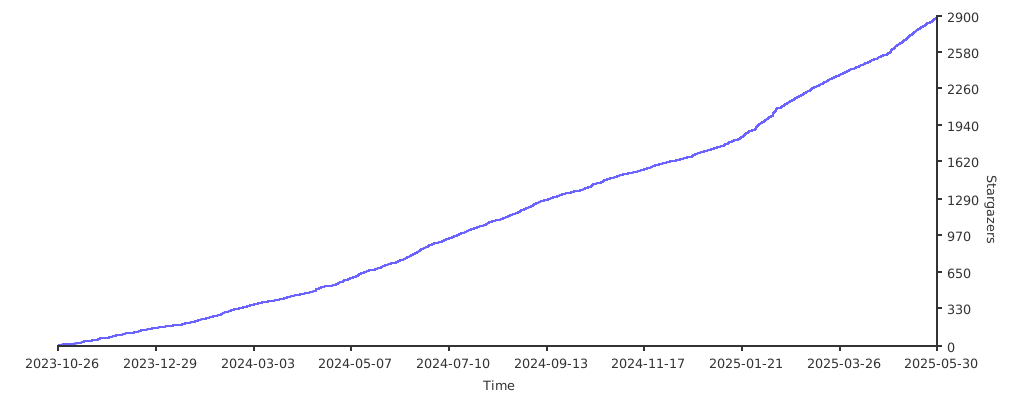](https://starchart.cc/JaKooLit/Arch-Hyprland)
|