Steps to install search plugins for qBittorrent version 3.1.10 or more recent
-
Note that python plugins/scripts are, by its nature, not considered to be safe. Therefore any use of the unofficial plugins is at your own risk. It is a good practice to audit/take a look at the plugin/script before you install.
-
Go to https://github.com/qbittorrent/search-plugins/wiki/Unofficial-search-plugins
- Under
Downloadcolumn, click on the appropriateDownloadlink - Save the
.pyfile into a temporary location on your local storage
- Under
-
Using qBittorrent Using the main window, click on
View->Search Engineto show search tab
- Go to the
Search tab - Click on
Search plugins...button. Which is located around the bottom right side. - The
Search pluginswindow will open. It shows a list of installed search engine plugins.- Click on
Install a new onebutton
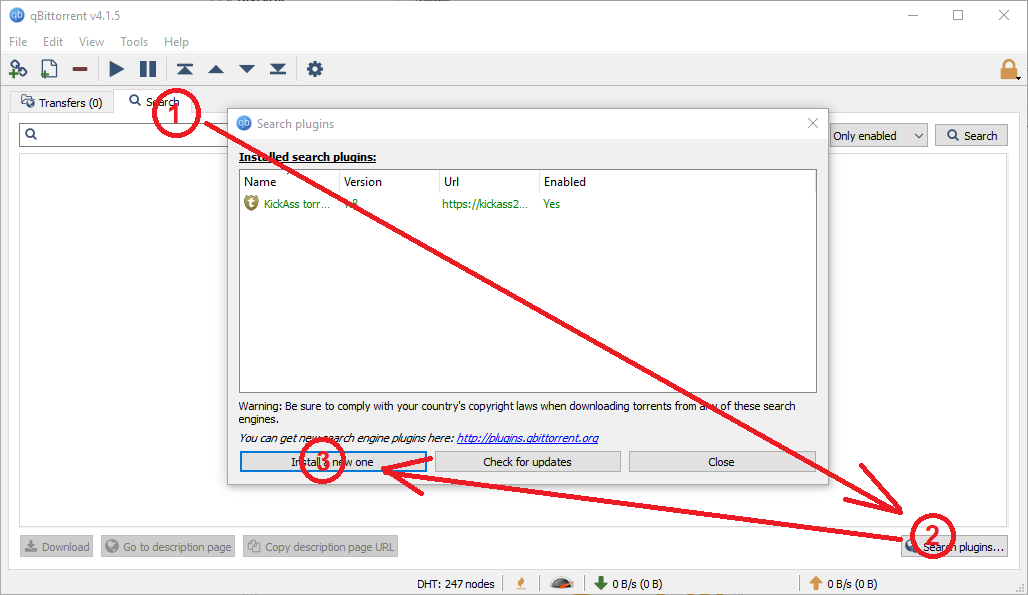 )
) - The
Plugin sourcewindow will open- Click on
Local filebutton - Navigate to the
.pyfile you downloaded in the step above. Select the.pyfile. - If successful the following message will be display
<PLUGIN.NAME> search engine plugin was successfully installed.
- If not successful the following message will be display
<PLUGIN.NAME> search engine plugin could not be installed.
- Using this page under the
Commentcolumn, double check that your system meets the minimum requirements for each search plugin. Maybe your present system does not have the requirements.
- Using this page under the
- Click on
- Click on
Closebutton
- Click on
- Go to the
-
You can delete the
.pyfile from your temporary location on your local storage, as it is no longer needed. -
Optionally, you can use the
Search pluginswindow to Enable or Deactivate search plugins, or check for updates. -
Done. You have successfully installed a new search plugin for qBittorrent.